Choosing Ergonomics Equipment for Small Business Owners on a Budget
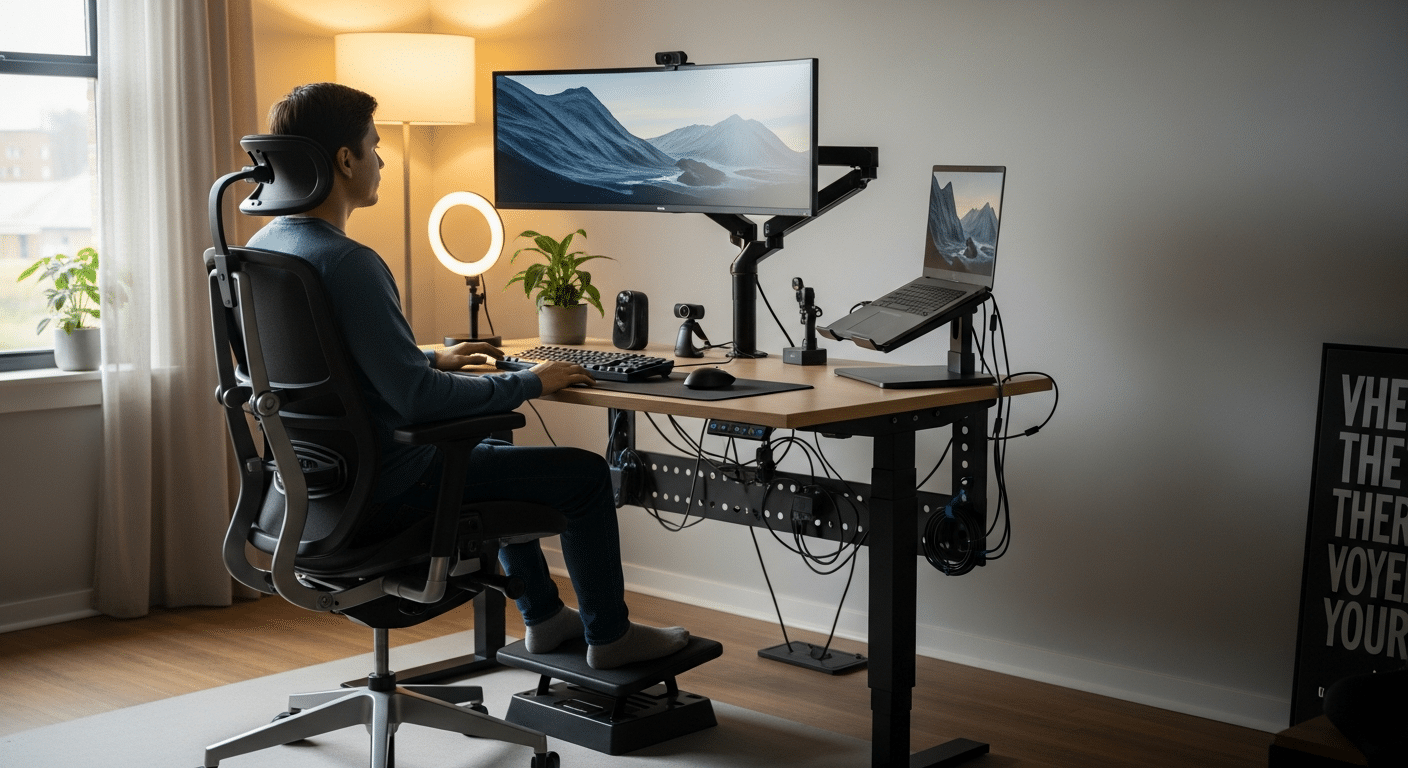
As a small business owner, you’re always looking for ways to boost productivity, reduce costs, and keep your employees happy and healthy. One often overlooked but powerful way to achieve all three is by investing in ergonomics equipment and supplies. A well-designed, ergonomic workspace not only minimizes the risk of workplace injuries but also enhances comfort and focus, leading to happier, more productive employees. However, you don’t need to break the bank to make meaningful improvements. In this guide, we’ll explore affordable ergonomic solutions that can make a huge difference in your workplace, all while staying within your budget.
1. How can I improve my office ergonomics without overspending?
Improving your office ergonomics doesn’t have to mean spending a fortune. Start by making simple, low-cost adjustments such as providing adjustable lumbar support cushions for chairs. These inexpensive additions support proper posture and reduce back pain. You can also use keyboard trays to ensure your hands are at a comfortable angle and footrests to reduce strain on legs. For screen height, stack books or boxes to elevate monitors to eye level. These affordable solutions significantly improve comfort and reduce the risk of injury without breaking the bank.
2. What are the most cost-effective ergonomic products for small businesses?
Some of the most budget-friendly ergonomic products for small businesses include:
- Lumbar Support Cushions: These affordable cushions can be added to any chair to provide additional lower back support.
- Laptop Stands: Elevate your laptop to eye level with adjustable stands, helping to reduce neck strain.
- Ergonomic Keyboards and Mice: These are designed to reduce wrist strain and improve typing posture.
- Standing Desk Converters: These allow employees to alternate between sitting and standing, promoting movement throughout the day.
These products are cost-effective, widely available, and can help create a more comfortable and productive work environment.
3. How do I assess my current office setup for ergonomic improvements?
Before purchasing any new equipment, evaluate your current office setup to identify areas for improvement. First, check if your chair provides adequate lumbar support. Feet should rest flat on the floor with your knees at a 90-degree angle. Next, assess your desk height and ensure that your elbows are at a 90-degree angle when typing. Your computer monitor should be at eye level to avoid neck strain. Regular assessments will help you identify ergonomic issues and prioritize changes to make your workspace more comfortable.
4. Are ergonomic investments worth the cost for small businesses?
Yes, investing in ergonomics is well worth the cost for small businesses. Ergonomic improvements can lead to a significant return on investment by reducing work-related injuries and absenteeism. Employees who work in comfortable and supportive environments are less likely to suffer from conditions like carpal tunnel syndrome, back pain, and neck strain. Additionally, ergonomic workspaces contribute to increased productivity, as employees experience fewer distractions due to discomfort. In the long run, ergonomic investments can also reduce healthcare costs and improve employee retention, offering a positive impact on your bottom line.
5. What are some free or low-cost ergonomic adjustments I can make?
Even without a budget for new equipment, there are several free or low-cost ways to improve ergonomics in your office:
- Adjust Your Seating: Use rolled towels or cushions for extra lumbar support.
- Modify Screen Height: Stack books or boxes under your monitor to raise it to eye level.
- Encourage Regular Breaks: Remind employees to take breaks every 30 minutes to stretch and move around. This prevents discomfort and fatigue.
- Promote Proper Posture: Ensure that employees are aware of sitting with their backs straight and feet flat on the floor.
These simple adjustments can greatly reduce strain and discomfort for employees without any additional cost.
6. How can I involve employees in ergonomic improvements?
Employee involvement is key to creating a healthy ergonomic workplace. Start by asking employees for feedback about their comfort levels. Provide training on proper posture, workstation setup, and the importance of taking regular breaks. Encourage employees to share any discomfort they experience and suggest ways to improve their workstations. Involving your team not only empowers them to take ownership of their comfort but also helps identify ergonomic issues that you might not have noticed. This collaborative approach can foster a more positive and productive work environment.
7. Where can I find affordable ergonomic equipment suppliers?
There are several places where you can find affordable ergonomic equipment. Local office supply stores often carry budget-friendly ergonomic products such as chairs, footrests, and keyboard trays. Online marketplaces like Amazon, Flipkart, and others offer a wide range of ergonomic supplies at various price points, allowing you to compare prices and read reviews. Additionally, consider purchasing second-hand or refurbished equipment, which can offer significant savings while still maintaining quality. Be sure to research and compare suppliers to find the best deals that suit your budget.
Top Affordable Ergonomic Products for Small Businesses
When it comes to creating an ergonomic workspace without overspending, there are several products that deliver excellent value:
- Ergonomic Chairs: Look for budget-friendly chairs that offer adjustable lumbar support and armrests. A quality chair supports your spine and reduces the risk of back pain.
- Adjustable Standing Desks: These desks allow employees to switch between sitting and standing, promoting better posture and reducing the negative effects of prolonged sitting.
- Keyboard and Mouse Alternatives: Ergonomic keyboards and mice are designed to reduce wrist strain and promote a natural typing position, preventing repetitive strain injuries like carpal tunnel syndrome.
- Footrests and Chair Cushions: Simple yet effective additions to ensure proper seating posture and leg support.
These products are available in a variety of price ranges, allowing small businesses to select what fits their needs and budget.
Benefits of Investing in Ergonomics Equipment
Investing in ergonomic equipment offers several long-term benefits:
- Reduced Absenteeism: Proper ergonomics help prevent work-related injuries such as back pain, wrist strain, and eye fatigue, leading to fewer sick days.
- Increased Productivity: Comfortable employees are less distracted by discomfort and more focused on their tasks, boosting overall productivity.
- Lower Healthcare Costs: Preventing musculoskeletal injuries can reduce the need for medical treatments and worker’s compensation claims.
- Improved Employee Retention: Investing in employees’ well-being shows that you care about their health, leading to higher employee satisfaction and retention.
How to Choose the Right Ergonomics Equipment for Your Business
When choosing ergonomic equipment for your business, consider the following:
- Understand Your Team’s Needs: Speak with employees about their comfort and identify the areas where they experience discomfort.
- Assess Your Space: Make sure that any new equipment fits within your office layout. Consider space-saving solutions like standing desk converters if space is limited.
- Prioritize Essentials: Start by investing in essential items like ergonomic chairs, keyboard trays, and monitor stands. Gradually add more equipment as your budget allows.
By considering your team’s specific needs and workspace limitations, you can make thoughtful decisions that create a comfortable and productive environment.
Improving your office ergonomics is a small investment that can yield significant benefits. By making simple, cost-effective adjustments or investing in affordable ergonomic products, you can create a healthier and more productive work environment for your team. Start small, assess your needs, and make gradual improvements to boost employee comfort and well-being.
FAQs
1. How can I improve my office ergonomics without overspending?
Improving office ergonomics doesn’t require a hefty investment. Start with simple, low-cost solutions:
- Lumbar Support Cushions: Use affordable cushions to support your lower back and promote good posture.
- Keyboard Trays: These allow you to adjust the height of your keyboard and reduce strain on your wrists.
- Footrests: These help improve posture by supporting your feet, especially if your chair doesn’t provide adequate height adjustments.
- DIY Solutions: Stack books or use boxes to elevate monitors to eye level, which helps prevent neck strain.
These small, budget-friendly changes can make a significant difference in comfort and productivity.
2. What are the most cost-effective ergonomic products for small businesses?
Some affordable ergonomic products that can significantly improve your office setup include:
- Lumbar Support Cushions: These are inexpensive and offer crucial lower back support, ensuring comfort during long work hours.
- Adjustable Laptop Stands: These raise your laptop to eye level, reducing neck and back strain.
- Ergonomic Keyboards and Mice: These products are designed to reduce wrist strain and improve typing posture.
- Standing Desk Converters: An affordable way to allow employees to alternate between sitting and standing, which can help reduce back pain and improve overall health.
These products are available at various price points, making it easier for small businesses to get ergonomic benefits without overspending.
3. How do I assess my current office setup for ergonomic improvements?
Start by evaluating the following elements in your office:
- Chair Height and Position: Ensure that your feet are flat on the floor with knees at a 90-degree angle. Use lumbar support to maintain a natural curve in your spine.
- Desk Height: Your elbows should be at a 90-degree angle when typing, and your wrists should float comfortably above the keyboard, not resting on the desk.
- Monitor Position: The top of your screen should be at or slightly below eye level to avoid neck strain. You may need to elevate your monitor using books or stands.
- Posture: Maintain a neutral spine position and avoid slumping or leaning forward. Regular posture checks can help prevent long-term strain.
By regularly assessing these areas, you can make targeted improvements to create a more ergonomic and comfortable workspace.
4. Are ergonomic investments worth the cost for small businesses?
Yes, ergonomic investments are definitely worth it for small businesses. Here’s why:
- Reduced Absenteeism: Ergonomic improvements help prevent work-related injuries such as back pain, carpal tunnel syndrome, and neck strain, reducing the number of sick days employees take.
- Increased Productivity: Comfortable employees are more focused and productive. Reducing discomfort means employees can work longer and with fewer distractions.
- Lower Healthcare Costs: Preventing musculoskeletal injuries can save your business money on medical expenses and worker’s compensation claims.
- Improved Employee Retention: Investing in ergonomics shows your employees that you care about their health, which can improve morale and retention.
The long-term benefits of ergonomic improvements far outweigh the initial investment, making it a smart choice for your business.
5. What are some free or low-cost ergonomic adjustments I can make?
There are several free or inexpensive changes you can make to improve office ergonomics:
- Adjust Your Seating: Use rolled towels or cushions to provide lumbar support, which can improve posture and reduce back pain.
- Modify Screen Height: Elevate your monitor by stacking books or using boxes so it’s at eye level, reducing neck strain.
- Encourage Movement: Set reminders for employees to take short breaks every 30 minutes to stretch, walk around, and change positions.
- Promote Proper Posture: Educate employees on maintaining a neutral spine while sitting and keeping their wrists in a neutral position when typing.
By incorporating these free or low-cost adjustments, you can improve employee comfort and prevent injuries without spending extra money.